KeriBlog

Cars, Security & a Peek into my Life

  • Keri on Twitter
  • Keri on Instagram
  • Keri on Facebook
  • Keri on LinkedIn
  • Keri on YouTube
  • Keri on Google Plus
  • Home
  • Home
  • Cars
  • Security
  • a Peek into my Life
  • ‘Keri on Driving’ Index Page

The Scariest Type of Malware – Ransomware

May 29 2014

Of all the types of malware, this one scares me the most.

Ransomware – a type of malicious software that locks, and sometimes encrypts, the victim’s entire computer. The victim is then informed that removal is only possible, when they pay a ransom fee to the creator of the malware. Basically, ALL your files get locked up, and someone else has the key. 

The Attack

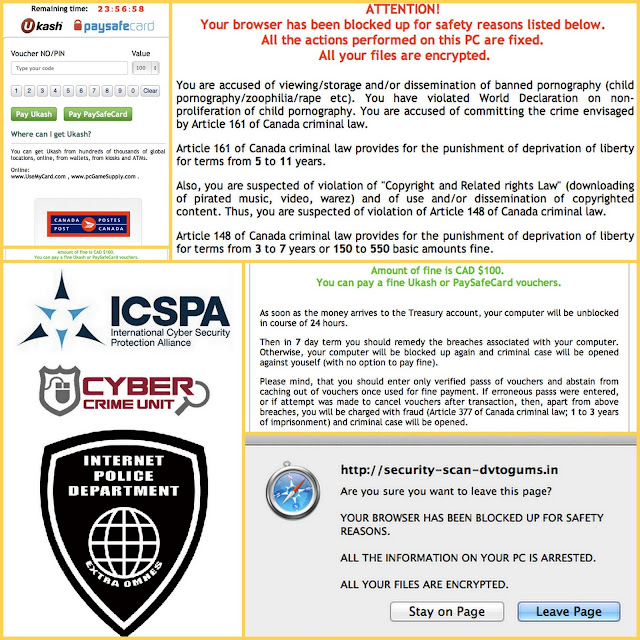
On my other computer, I was catching up on celebrity gossip, and streaming TV from a sketchy Eastern European site, when this page overtook my browser.
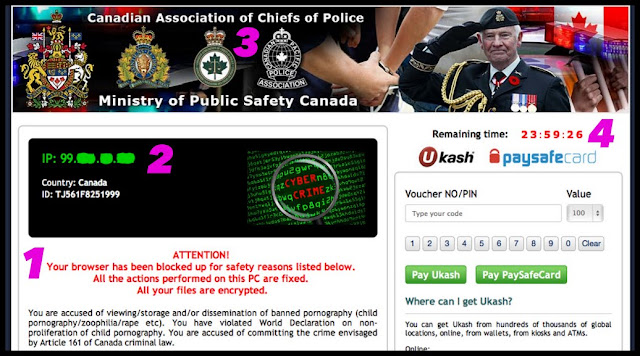
1 – informs me all my files have been encrypted
2 – shows my IP address, which didn’t pinpoint my exact physical location, but was pretty close
3 – ransomware often uses this popular ‘police-theme’, to give the illusion of authenticity, and heighten fear
4 – a scary countdown timer; I have 24 hours to pay the ransom
The Defence

Ransomware is usually installed from clicking a bad link on social media, in a website or email, opening a malicious email attachment, or sometimes just visiting a malicious site.

A closer investigation reveals this is mostly scareware. The English is poor, I’m on a Mac not a PC, the “Internet Police Department” uh-huh, and child p0rn phft as if, I don’t even really like kids.

Plus, 24 hours have passed, and my computer is fine.

Notice though, I said “my other computer“.

Because never would I visit those sites on my work computer. Which is why, had this actually happened, my solution would be to wipe the entire laptop, wouldn’t matter, there’s nothing on it. Opposite of this computer.

Keep your anti-virus software updated, your firewall on, and be careful what you click.

The Fix 

It’s up to you if you decide to pay the ransom.

F-Secure has removal instructions, as does Norton.  Or take you computer to your trusted IT repair place.

Regularly backup your files.


Thanks for sharing:

  • Facebook
  • Twitter
  • Pinterest
  • LinkedIn

Filed Under: Security Tagged With: attack, careful what you click, don't click it, f-secure, malware, norton, ransomware, virus, Viruses and Trojans

Something to Remember Always

May 28 2014

Because it doesn’t.

If you don’t want it public, don’t put it online.

Because once it is, it’s there forever… regardless if it’s deleted, regardless if it’s “protected” or “private”, proof.


Thanks for sharing:

  • Facebook
  • Twitter
  • Pinterest
  • LinkedIn

Filed Under: Security Tagged With: google never forgets, google+

The Only Way to Delete Data

May 12 2014

Is to absolutely destroy it.

Data can even be recovered from this melted laptop.

Once it goes online, consider it public.

Even “protected photos” are not immune, as proven in this incident.

(other KeriBlog-Approved method of deleting data here).


Thanks for sharing:

  • Facebook
  • Twitter
  • Pinterest
  • LinkedIn

Filed Under: Security Tagged With: data recovery

It’s a Good Idea to Monitor Connections

Apr 28 2014

When you visit to a website, there are multiple connections happening behind the scenes, not only one connection, like it appears.

For an idea, some conservative estimates:

– a reasonably popular site – 25+ connections
– KeriBlog – 4
– Buzzfeed – 50+

It’s a good idea to monitor these, and approve / deny what you feel comfortable with connecting to your laptop.

Example:

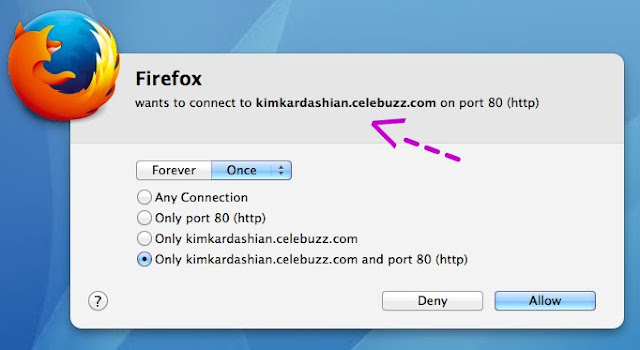
Why, out of nowhere, is Celebuzz site trying to connect to my machine?

At the time of this connection request, I was not surfing gossip sites, but I have in the past, which is why the site is checking in on me.

Connection denied.

How I’m doing this

I use a program called Little Snitch.

(this is NOT an endorsement)

It installs deep in my operating system, so no matter which program I’m using (iTunes / internet browser / photo editing software), it halts all incoming connections, until I tell it how to proceed.

It looks like this:

You teach it rules (example: I accept all connections from Google.ca, I deny all connections to many ad serving URLs).

I deny everything with “track”, “metrics” or “ads” in the URL, and don’t much notice a decline in quality of browsing.

It’s free to try, and a licence is $35. I bought mine like, 4 years ago, still works.

How this helps

Keeping your computing environment as clean as possible helps. And monitoring software, while it doesn’t replace an anti-virus software, can help catch malicious connections.

A small example:

While streaming TV from one-of-those sites, the site asked to have some dedicated space on my hard drive…

Had I not stopped the connection, the website would have not only connected to my laptop,
but stored up to 1 MB of “something” on it!

The video played fine even after I denied it access.

They’re not posting free, timely TV episodes because of kindness, because they care if I’m up-to-date on The Office.  This is the price guys. 


Thanks for sharing:

  • Facebook
  • Twitter
  • Pinterest
  • LinkedIn

Filed Under: Security Tagged With: little snitch, monitoring, social media security

WiFi in Cars is Coming this Summer

Apr 15 2014

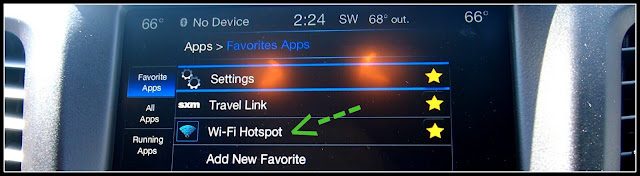
I’ve written about it at work, but this was my first experience using it in real life.

For more details, read my column from February.

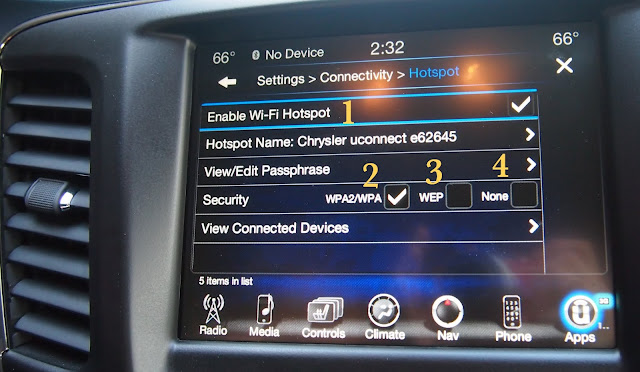
1 – it functions much like the Hotspot feature on a cel phone: car broadcasts WiFi > passengers connect to car > go online

Securing your car will be similar to securing your home WiFi.

2 – choose this option, WPA2
3 – don’t bother with WEP
4 – if you check this, please leave my blog

Because remember, you are legally responsible for Hotspot users.

Blog tag = WiFi Security


Thanks for sharing:

  • Facebook
  • Twitter
  • Pinterest
  • LinkedIn

Filed Under: Car Talk, Security Tagged With: auto security, Chrysler, wifi in cars, wifi security

  • « Previous Page
  • 1
  • …
  • 17
  • 18
  • 19
  • 20
  • 21
  • …
  • 51
  • Next Page »

[footer_backtotop]

Copyright © 2007-2015 KeriBlog.com All rights reserved. Advertising / Privacy Policy / Contact