KeriBlog

Cars, Security & a Peek into my Life

  • Keri on Twitter
  • Keri on Instagram
  • Keri on Facebook
  • Keri on LinkedIn
  • Keri on YouTube
  • Keri on Google Plus
  • Home
  • Home
  • Cars
  • Security
  • a Peek into my Life
  • ‘Keri on Driving’ Index Page

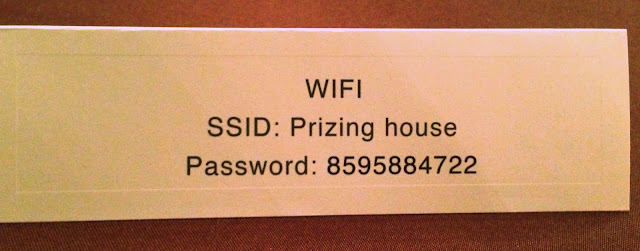
SSID = WiFi Name

Dec 10 2013

SSID – service set identifier

Big mystery solved eh, eye roll.

It’s like, a snobby way of asking the WiFi network name… “oh Clarence, what’s your SSID dahling?” *tea cup pinky*

When securing your WiFi network use WPA2 (never WEP). Then hide the name, don’t broadcast it, “cloak your network”, practice security through obscurity.

How to do that, here: How to Change your Router Password


Thanks for sharing:

  • Facebook
  • Twitter
  • Pinterest
  • LinkedIn

Filed Under: Security Tagged With: mystery, security through obscurity, SSID, WiFi, wifi security

Be Cautious Using Hotel Lobby WiFi

Dec 9 2013

Wanting to make it easy for guests, a hotel lobby WiFi network is usually left open and unsecured, no password required.

Avoid submitting passwords and credit card numbers
while using this network.

A lobby is a target rich environment – the people using hotel WiFi are often booking travel plans, making reservations, using their credit card. Plus, it’s easy to blend into a lobby, and not look out of place sitting for a long time with a laptop.


Thanks for sharing:

  • Facebook
  • Twitter
  • Pinterest
  • LinkedIn

Filed Under: Security Tagged With: passwords, WiFi, wifi security

The 3 Types of Shredders

Dec 5 2013

#1 – Strip Cut

Spotted at this year’s SecTor online security conference. It was part of the capture-the-flag game, and a good example of why to never buy or use a strip cut shredder.

#2 – Cross Cut

This is what I own.

It’s not as secure as you think though, because look: this is me digging for only a few minutes.

Note the last line.

See how I made it seem like I’m up to something nefarious? Information is a weapon guys, dispose of it accordingly.

#3 – Micro Cut

AKA “confetti cut”. I should’ve spent the extra few bucks and bought one of these.

It just annihilates the document.

Don’t make the mistake I did, and buy a micro shreder.


Thanks for sharing:

  • Facebook
  • Twitter
  • Pinterest
  • LinkedIn

Filed Under: Security Tagged With: shred

Circumventing

Nov 29 2013


Thanks for sharing:

  • Facebook
  • Twitter
  • Pinterest
  • LinkedIn

Filed Under: Security Tagged With: pentest

Don’t Let Downloads Open Automatically

Nov 26 2013

In your internet browser preferences, look for the option, “open files automatically after downloading” and make sure it is OFF.

This is a Safari example.

There are no “safe files”.

Opening a file is what unleashes the problems.

Those problems (malware, virus, trojan horse, whatever) can be hidden within a photo, text document, music file, and especially a PDF.

The Attack:

Visit a webpage > a file is downloaded without your consent > that box is checked > file opens > computer is compromised

The Defence:

Any service that allows you to download a file, should have this setting OFF.  Skype, chat program, email program…

Therefore, even if the file downloads automatically, you can then delete it from the downloads folder, without opening it.


Thanks for sharing:

  • Facebook
  • Twitter
  • Pinterest
  • LinkedIn

Filed Under: Security Tagged With: download, PDF

  • « Previous Page
  • 1
  • …
  • 23
  • 24
  • 25
  • 26
  • 27
  • …
  • 51
  • Next Page »

[footer_backtotop]

Copyright © 2007-2015 KeriBlog.com All rights reserved. Advertising / Privacy Policy / Contact