KeriBlog

Cars, Security & a Peek into my Life

  • Keri on Twitter
  • Keri on Instagram
  • Keri on Facebook
  • Keri on LinkedIn
  • Keri on YouTube
  • Keri on Google Plus
  • Home
  • Home
  • Cars
  • Security
  • a Peek into my Life
  • ‘Keri on Driving’ Index Page

Why Analyze a Photo’s EXIF and Metadata

Feb 2 2015

Metadata and EXIF data –  information and data attached to a photo.

This data can be used to make educated guesses about the sender / poster, and their behaviour.

For example:

1 – time stamps – is this a fresh photo or is it canned? How old is it then, hours or weeks?

If there is no time stamp, the photo could be a screenshot, so why send a screenshot instead of the original?

2 – what was used to take the photo, a camera or phone? What make and model?

3 – is it the original or was the photo edited? What part, and why?

4 – what image number is it? Check against the number of the last photo(s) posted.

5 – is geo-location on or off? Use the coordinates to map it. Confirm they are where they said they are. Can a pattern of movement be determined by mapping the posted photos? What about cross-referencing against the time stamps?

Important to remember – it’s a guide, not an exact science, because EXIF data can be altered, or technical glitches can happen.

This is good way to find patterns, not exact facts.


Thanks for sharing:

  • Facebook
  • Twitter
  • Pinterest
  • LinkedIn

Filed Under: Security Tagged With: EXIF, metadata, OSINT

Flashlight Defeats Camera

Jan 30 2015

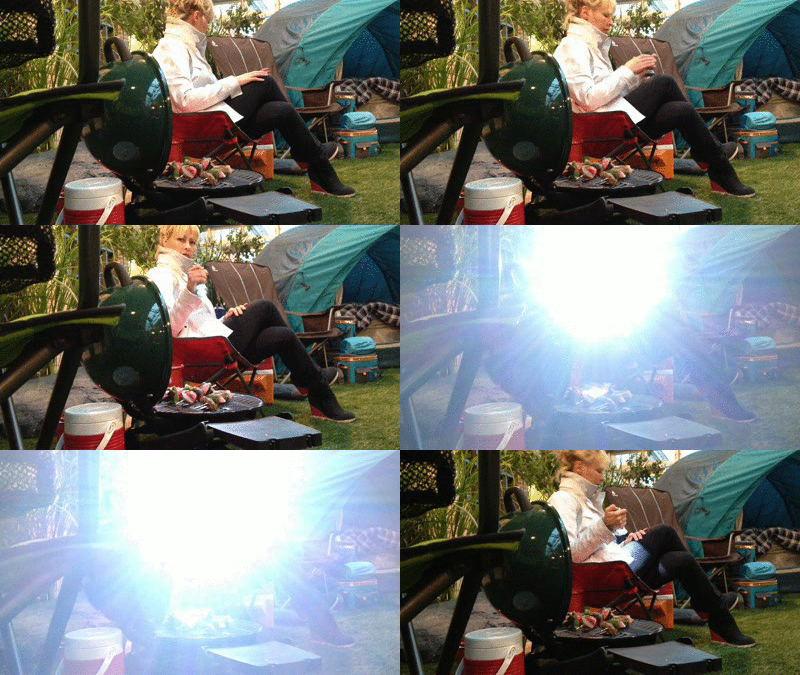
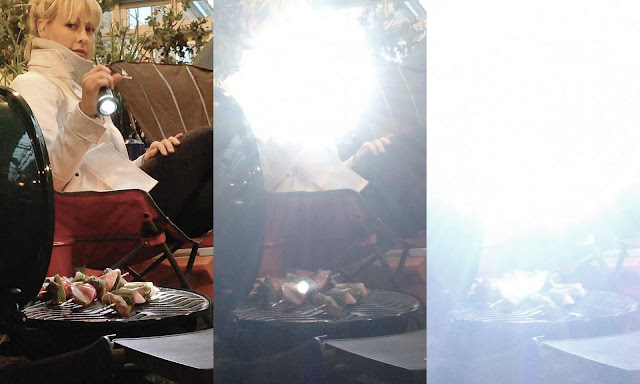
Overload a lens with light, and it freaks out and basically goes blind.

Flashlight beats camera keriblog

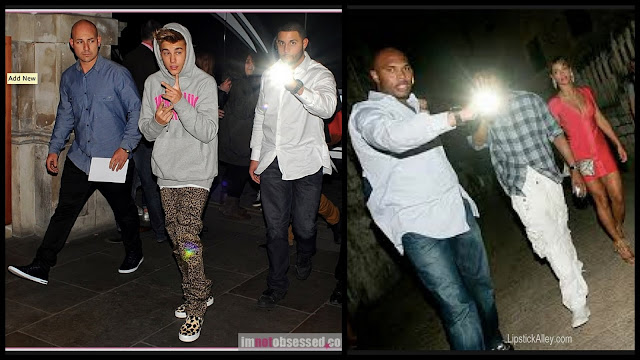
That’s why you see celebrity’s bodyguards pointing flashlights into cameras, they’re preventing photos from being taken.


Thanks for sharing:

  • Facebook
  • Twitter
  • Pinterest
  • LinkedIn

Filed Under: Animated Gifs, Security Tagged With: animated gif

The Math Behind Having a Long Password

Jan 30 2015

Longer passwords are better, but why? 2 reasons.

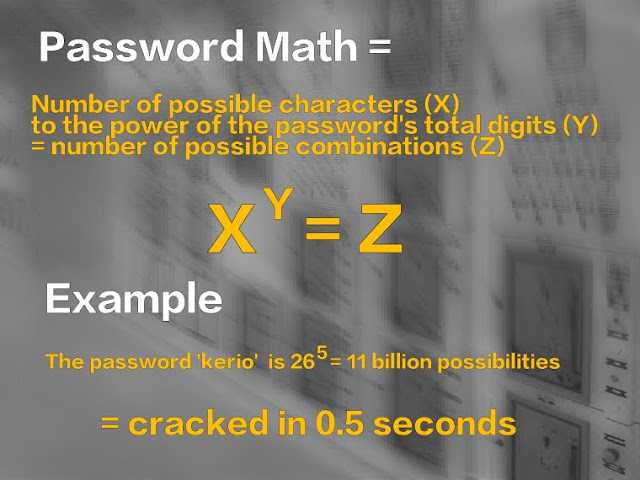
1st – this mathematical formula:

XY= Z

2nd – that a password guessing script can make 25 billion guesses, per second.

So! 

The password – kerio – uses only lower case alphabetical characters, of which there are 26.

So our formula is: 265 = 11 billion = cracked in 0.5 seconds

The bigger both numbers =
the better off you are

Here’s a proper, 25-digit password:  “)pCdjAL’x*^KgV3XE!x*w!1P

It uses lower case letters (26), upper case (26), numbers (10), and symbols (32) = 9425 = 2.1291014e+49 = cracked in weeks = attacker likely moves onto an easier target

***

This post has been brought to you by Nuix and KeriBlog.

Meet Nuix here.


Thanks for sharing:

  • Facebook
  • Twitter
  • Pinterest
  • LinkedIn

Filed Under: Security Tagged With: 2.1291014e+49, math, nuix, Nuix & KeriBlog Security Series, passwords

How to Use a Password Manager

Jan 28 2015

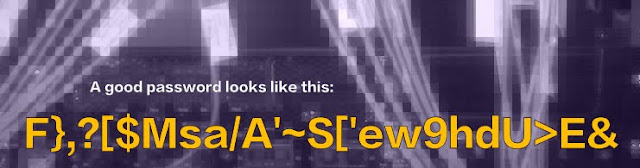
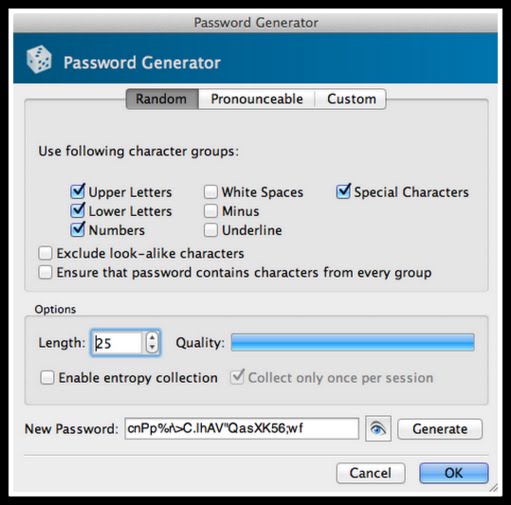
A strong password looks like this:

That’s difficult to brute force, and a dictionary attack won’t work on it… but how do you remember this?

You don’t – your password manager does.

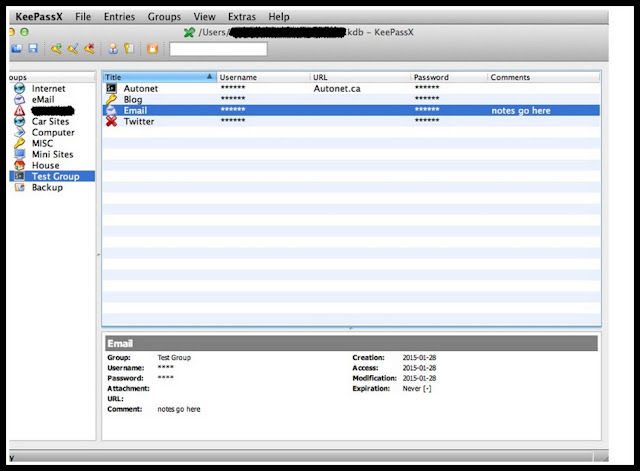
Here, I made a fake one to show you, this is inside my manager.

How it works:

1 – make 1 master password, like 25 characters long, write it down on paper, and ideally, memorize it, then store a physical copy somewhere other than home
2 – use that master password to log into the manager. That’s it, no more remembering from here on
3 – use the password generator to create a unique password for each site you log into

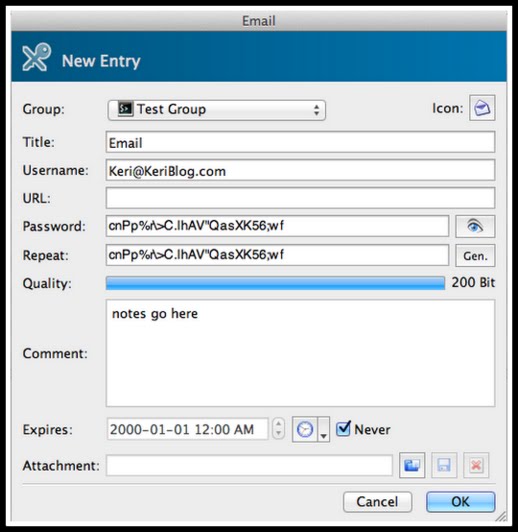
Add login information, notes, click okay to save.

To log into a site: go to manager > copy the password > back to browser > paste > done

4 – routinely backup the database, and store it on 2 USB keys in 2 locations (why? Here.)

Which manager program to use?

Here’s a shopping list:

– 256 encryption minimum, AES-256 (Advanced Encryption Standard)
– ideally the backup file is encrypted
– has the ability to exclude certain characters when generating passwords
– can sync between devices
– be wary of plugins that are independent of any software
– simple is best! It’s like a car – the more features it has, the more there is to break

Possible Programs:

– KeePassX – open source

– 1Password – (a Canadian company!)

– Password Safe – open source

Important: this is not an endorsement any of these programs, do your homework

This post has been brought to you by Nuix and KeriBlog.

Meet Nuix here.


Thanks for sharing:

  • Facebook
  • Twitter
  • Pinterest
  • LinkedIn

Filed Under: Security Tagged With: nuix, Nuix & KeriBlog Security Series, password manager, passwords

Auto Security 40 Years Ago

Jan 26 2015

If I was blogging about auto security back then, here’s what I’d be saying.

– when parking, turn off the ignition and take the key with you

– when returning to your parked car, make sure both your licence plate and VIN number plate aren’t missing

– remember to add a gas line shut-off lock

– they had car alarms back then

***

Blog tag = auto security


Thanks for sharing:

  • Facebook
  • Twitter
  • Pinterest
  • LinkedIn

Filed Under: Car Talk, Security Tagged With: auto security

  • « Previous Page
  • 1
  • …
  • 10
  • 11
  • 12
  • 13
  • 14
  • …
  • 51
  • Next Page »

[footer_backtotop]

Copyright © 2007-2015 KeriBlog.com All rights reserved. Advertising / Privacy Policy / Contact